Web app live · Insight engine
It tells you what to do next week.
Log load, reps, RPE and RIR. Atelier Train reads your e1RM slope, per-muscle volume and recent load — then names the next step. 870+ exercises across free weights, machines and bodyweight. Six session types, one history.
Free plan, no card. Premium free through launch — founding accounts keep the launch price.
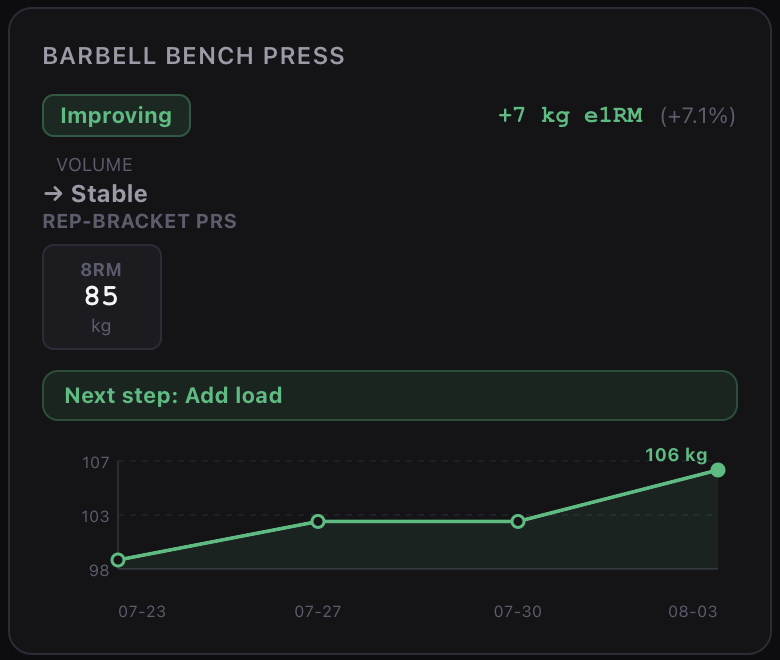
Real output — Analytics → Progress, 14-day window.
Why this exists
I could not find a good app, so I built one.
Ten years of training, all of it in a paper notebook. Every set, every number, written by hand — and it still could not tell me whether any of it was working.
I tried the apps. None logged the way I actually train, and none did anything with the numbers once they had them. So I built the one I needed — to fit my training, and then to fit everyone else's.
Which means it assumes you already measure. If you log RIR, know roughly where your e1RM sits and think in blocks rather than workouts, this will read as familiar. If you have never written a session down, this is probably not your first app.
— Founder, Atelier Train
Insight
Rules you can audit, not a model guessing.
Insight is deterministic: rules-based heuristics applied to the numbers you logged, nothing else. One screen gives you training status, main limiter and next best action, with the working shown — ACWR, readiness, pain flags, data confidence. It is the arithmetic you would do by hand, run after every session, and it says so when its own reading is thin.
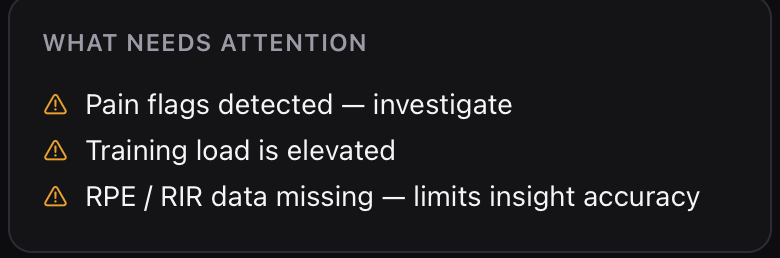
Including when it tells you its own reading is thin.
It reads
e1RM slope, effective sets per muscle, volume trend, rep-bracket PRs, session tonnage.
It weighs
Acute-to-chronic load, readiness, pain flags, program phase, available time, equipment on hand.
It says
“Next step: Add load.”
One instruction per lift. No score to interpret.
Logging
Every set, in the language you already use.
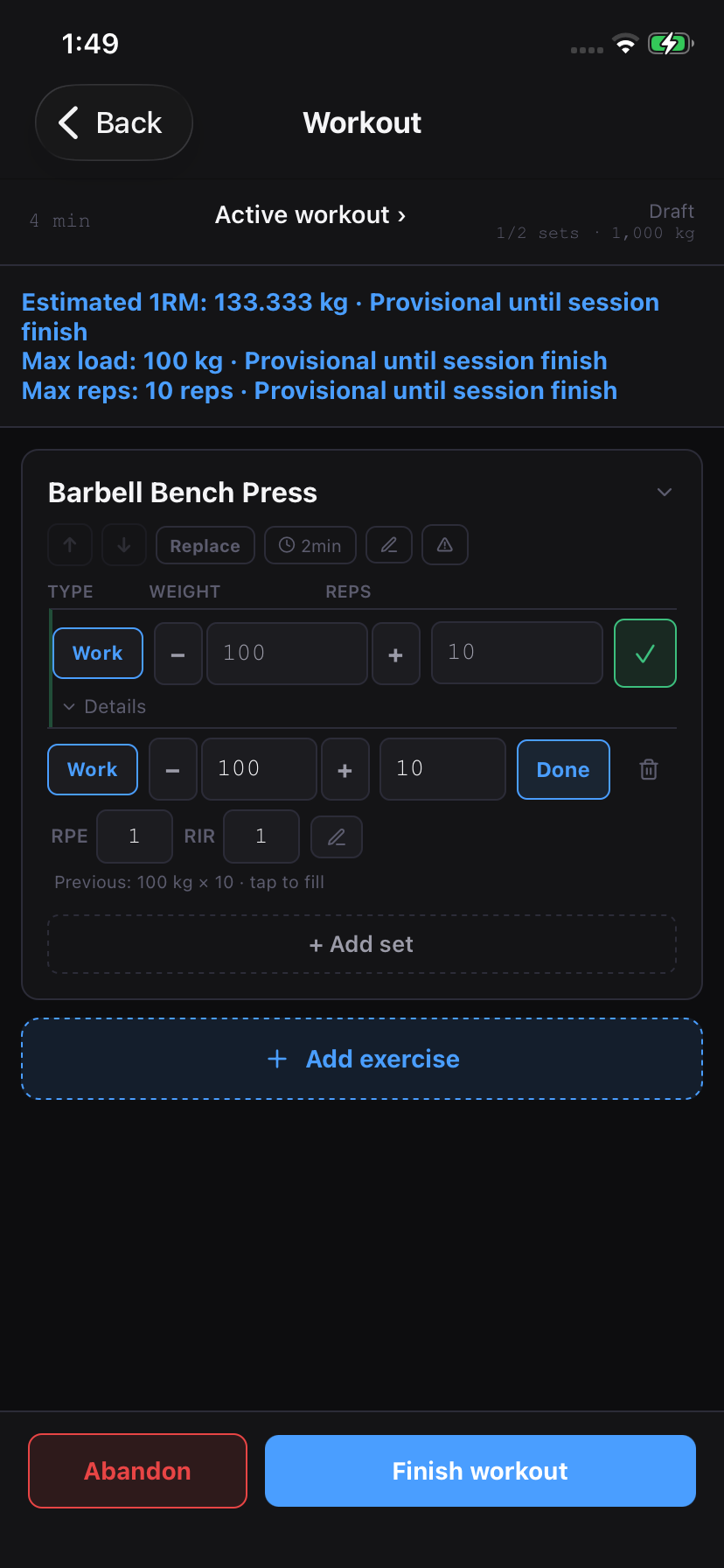
Load, reps, RPE and RIR on every set, with last session's numbers one tap away. The library indexes machines by manufacturer and searches alternate names, so "ISO lateral shoulder" finds the Hammer Strength and Arsenal plates you actually train on. Set types, rest timer, supersets and intensity techniques stay inside the live session — and estimated 1RM updates as you go.
Per set
RPE + RIR
Last session
Tap to fill
Live
Estimated 1RM
Analytics
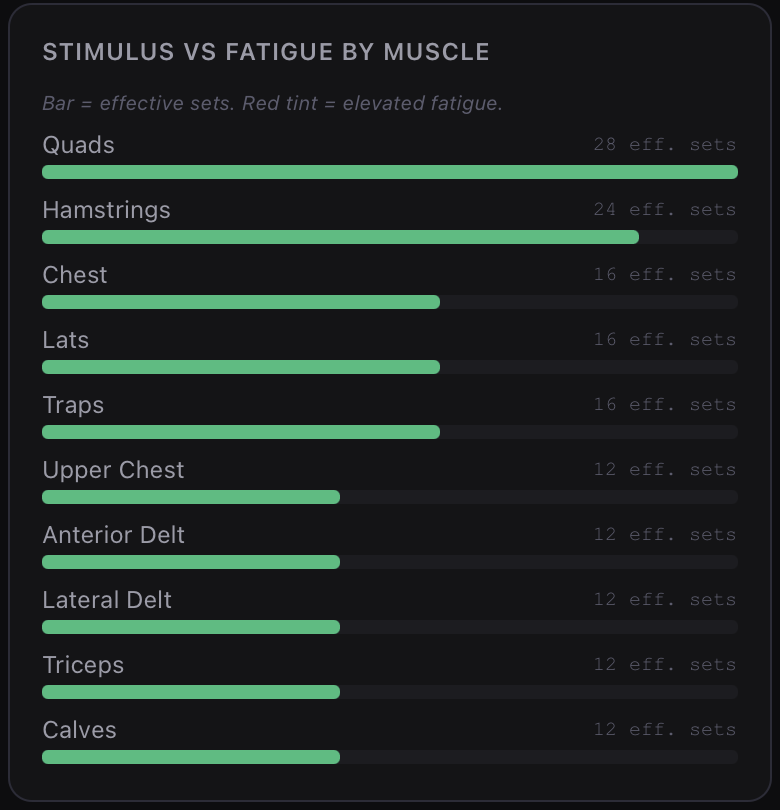
Effective sets, not sets you happened to do.
The Muscles view compares stimulus with fatigue for every muscle group. It flags groups accumulating too much work and ranks weak points by priority — for example, Rear Delt at 3 sets per week before Hamstrings at 6. All seven views share one history, with windows from one week to one year.
Progress
e1RM trend per lift, improving or stalling.
Muscles
Effective sets, fatigue and weak points.
Load
Tonnage and hard-set accumulation.
Readiness
Sleep, energy, soreness, mood.
Condition
Conditioning and pain-log context.
Body
Composition and measurements over time.
Insight Premium
The read-out, turned into a next step.
Every number on this page came out of the app.
Screenshots, not mockups. The card at the top is a real fourteen-day window.
Session types
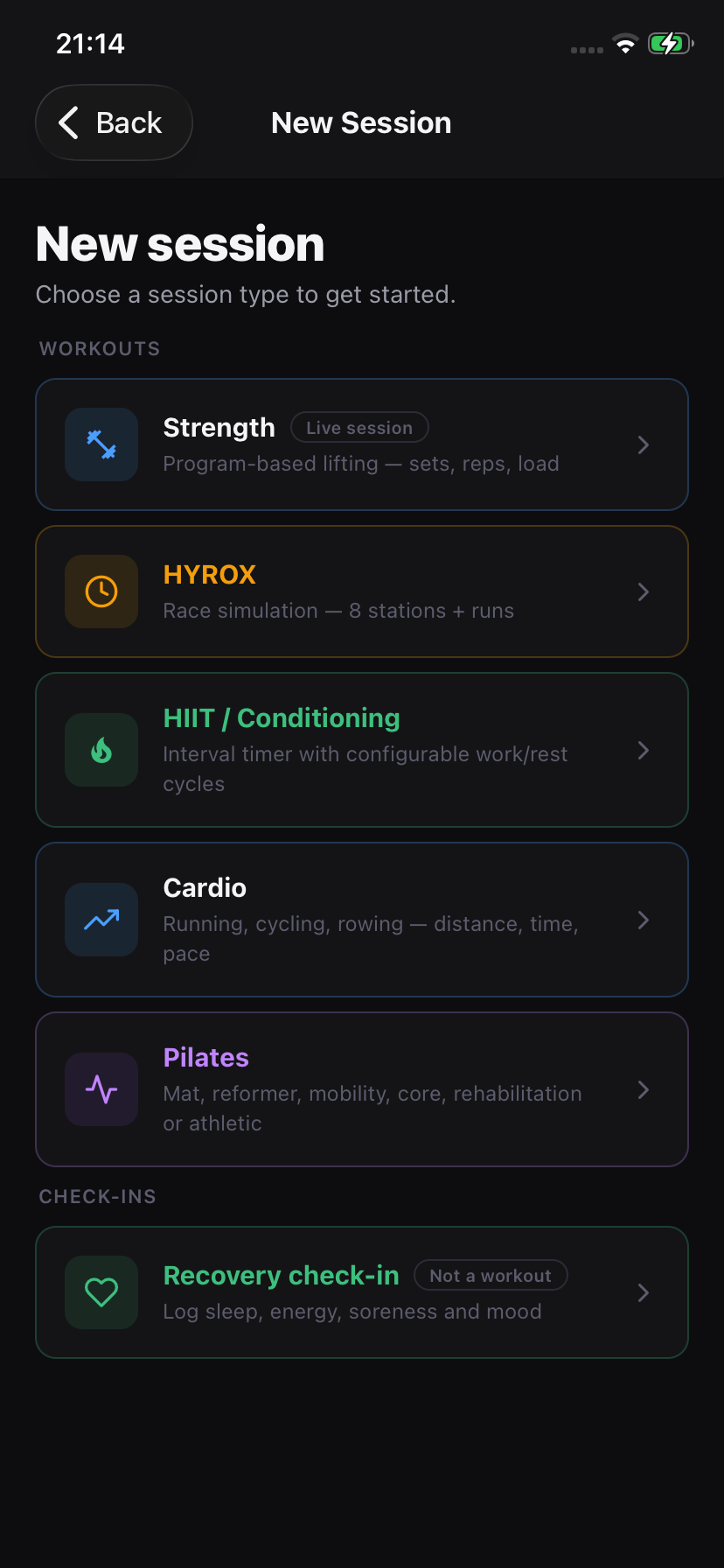
Six ways to train. One history.
Strength
Program-based lifting — sets, reps, load
HYROX
Race simulation — 8 stations + runs. See the HYROX page
HIIT / Conditioning
Interval timer with configurable work/rest cycles
Cardio
Running, cycling, rowing — distance, time, pace
Pilates
Mat, reformer, mobility, core, rehabilitation or athletic
Recovery check-in
Sleep, energy, soreness and mood — not a workout
Generate
Never open a blank session.
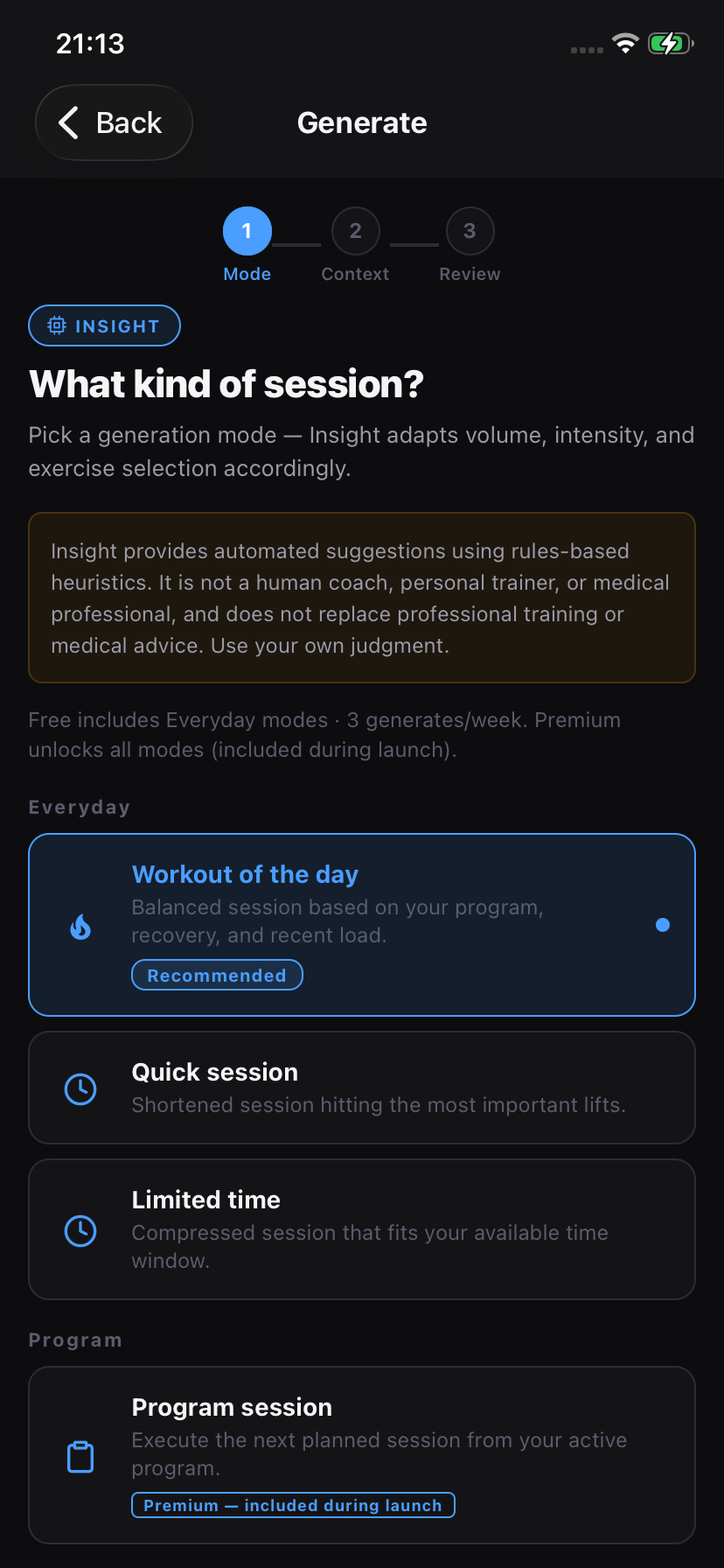
Pick a mode. Insight adapts volume, intensity and exercise selection to your program, recovery, recent load, morphology, the equipment your gym actually has and anything in your pain log — then starts it as a real logged session, not a suggestion you retype.
Everyday
Workout of the day, quick session, limited time.
Program
Next planned session, or a replacement for today.
Goal focus
Hypertrophy, strength, weak-point priority, deload.
Constraints
Only the equipment you have, or a low-recovery day.
Eleven modes across four families. Free includes the Everyday three, at three generates per week; Premium unlocks the rest — included during launch.
Switching
Bring your history with you.
Three years of logs in another app is a real reason not to move. Import brings those sessions across — it is in beta, so check the result before you delete anything at the other end. Export runs the other way, always: your history leaves as easily as it arrived.
Import Beta
Your existing sessions, brought in.
Export
Full history, any time, no request form.
Pricing
Free to download. Free to keep using.
No trial timer and no card at sign-up. Premium unlocks Insight and every Generate mode, and it is included for every account through launch. When the subscription starts, the price is announced first and founding accounts keep it — and your history stays exportable either way.
Free
Free
No card, no trial countdown.
Unlimited logging, all six session types
870+ exercises plus your own customs
Progress, Muscles, Load and Body analytics
Everyday Generate modes — 3 per week
Cloud sync across phone and web
Full data export, any time
Premium Launch
Included
Free through launch. Founding accounts keep the launch price.
Everything in Free
Insight — next-step suggestions per lift
All Generate modes, unlimited generates
Readiness and Condition analytics
Morphology-aware exercise selection
Programming
Blocks built on volume landmarks.
Set MEV, MAV and MRV for each muscle. The mesocycle moves between those landmarks through accumulation, intensification and deload. Choose linear, step, wave or flat progression, and deload by load or volume. Each exercise has thirteen progression models, from double progression and RPE-based progression to autoregulation. Deload weeks are scheduled instead of left to memory.
Morphology
Cues built from how your body moves.
Ankle, hip and shoulder mobility, foot arch, knee alignment, spinal posture, laterality — recorded once as tendencies, not diagnoses. Three essentials unlock soft planning cues, and Generate weighs them when it picks your exercises.
Sharing
Read-only links, revocable.
Coach, friend or follower — seventeen sections you switch on individually, a lookback window and an expiry set separately, sent by link or QR. Morphology, pain, recovery and nutrition are sensitive and stay off unless you turn them on. Revoke whenever.
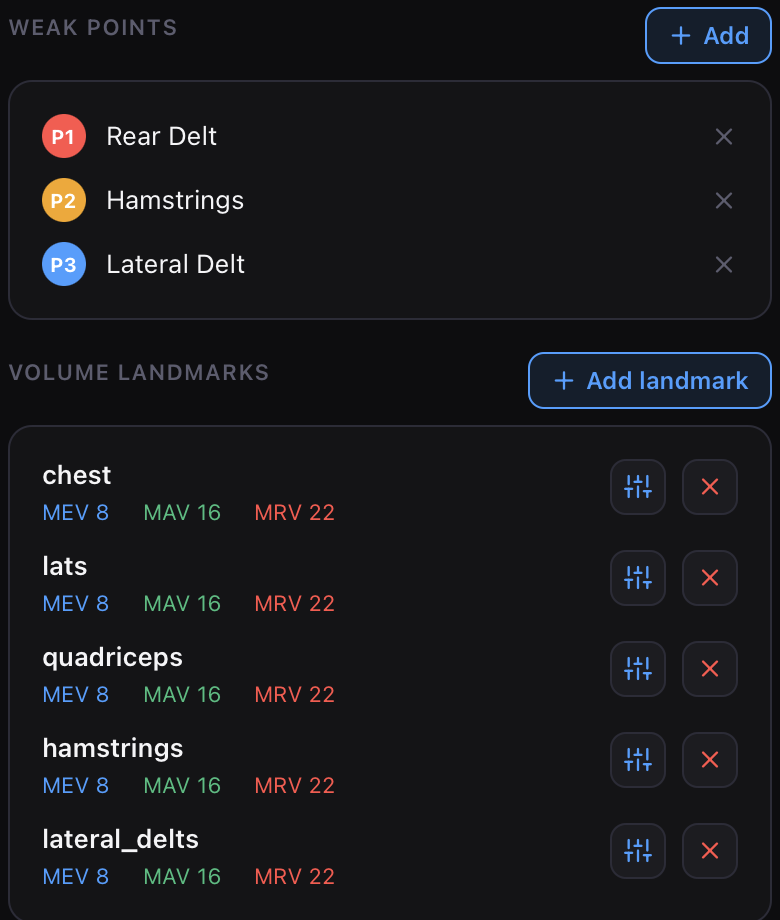
Weak points ranked, and a minimum, adaptive and maximum volume per muscle.
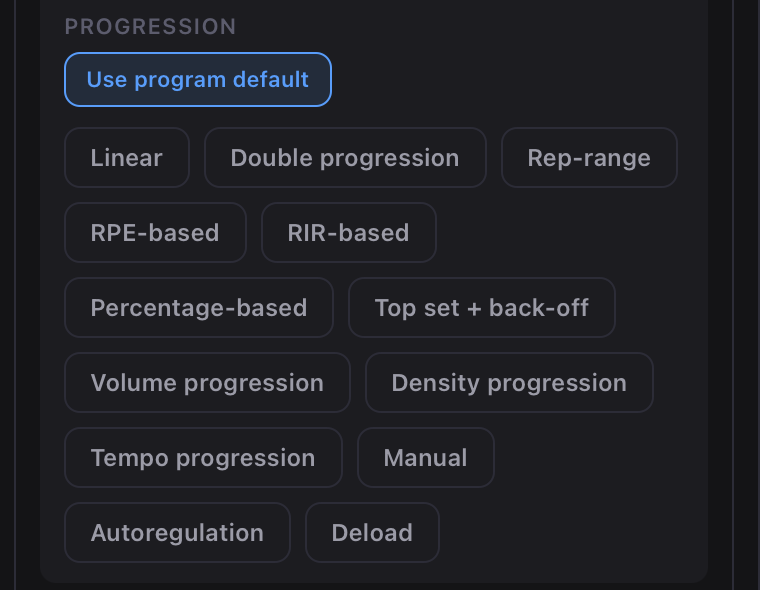
Thirteen progression models, set per exercise — not one rule for the whole app.
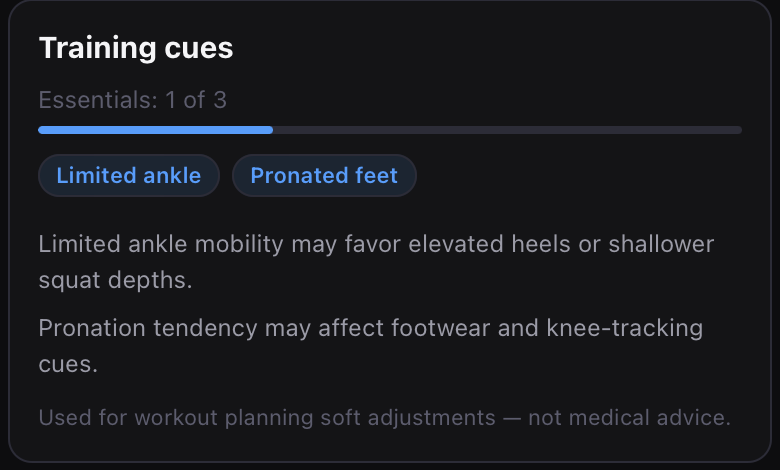
Two traits recorded, two cues out. Soft adjustments, not medical advice.
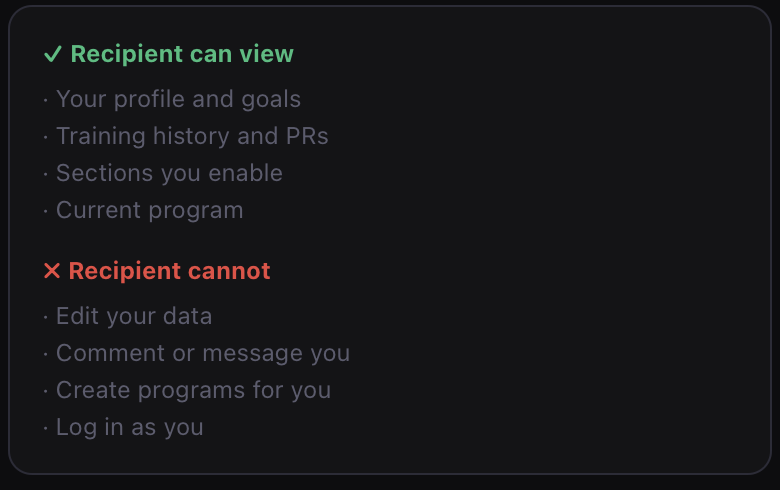
Spelled out before you send it — including what they cannot do.
Calculators
Nine tools you currently keep in browser tabs.
Load the bar from your gym's real plate inventory. Estimate one-rep max with the full formula breakdown, not one unexplained number. The calculators also work together: fill from your PRs, send a 1RM to the plate calculator, and apply calculated macro targets to your nutrition goals.
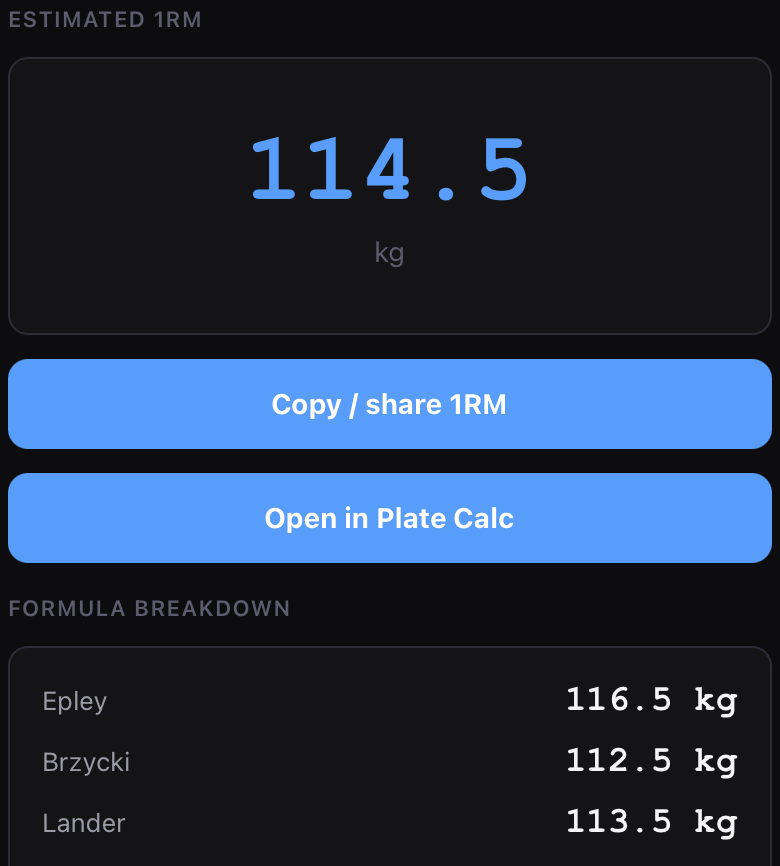
Epley, Brzycki and Lander, side by side. Then straight into the plate calculator.
Plate calculator
Your bar, your plates, achievable total.
One-rep max
Four formulas, shown side by side.
Powerlifting score
Wilks 2020, DOTS, IPF GL points.
Strength standards
Population levels and Poliquin structural balance.
Body composition
BMI, FFMI, Navy BF%, max lean mass.
TDEE and macros
Calories, protein, carbs, fat — appliable.
Heart rate and VO₂max
Zones, VO₂max, running pace.
Race time predictor
HYROX finish estimate and split table.
Unit converter
kg↔lbs, cm↔ft/in, km↔mi, pace.
Questions
What is Atelier Train?
A training app for lifters who already know their numbers. You log with load, reps, RPE and RIR; it tracks e1RM and per-muscle volume, and Insight names the next step for each lift. Cloud sync across phone and web.
Is Insight an AI coach?
No. Insight applies rules-based heuristics to your logged data and shows the numbers behind every suggestion. It is not a human coach, personal trainer or medical professional, and it does not replace professional training or medical advice.
Which session types can I log?
Strength, HYROX, HIIT / Conditioning, Cardio and Pilates as workouts, plus Recovery check-ins for sleep, energy, soreness and mood.
What is free and what is Premium?
The app is free to use: unlimited logging, the full exercise library, core analytics and Everyday Generate modes at three per week. Premium adds Insight, all Generate modes and deeper analytics. It is included for every account through launch and becomes a subscription after — announced before it starts, at a price founding accounts keep.
How does sharing work?
You create a read-only link, choose which views it exposes and how far back it reaches, and revoke it at any time. Works for a coach, a training partner or anyone following your training — none of them get account access.
Is there a mobile app?
The web app is live at app.ateliertrain.com with Google, Apple or email sign-in, and it works on a phone browser today. Native App Store and Google Play builds are next.
Log tonight's session. See the next step by Sunday.
The web app is live. Native iOS and Android apps are next. Sign in with Google, Apple or email; your history syncs from the first set. Export it whenever you want, and import from your old tracker (beta).
Available in English, Spanish, French, German, Italian, Portuguese, Japanese, Korean, and Chinese (Simplified and Traditional).
Launching Web · App Store · Google Play